
Documentation site
apps/docs is the site you're reading right now. It's a Next.js 15 app built with Fumadocs, which turns MDX files into a searchable documentation site.
Stack
- Next.js 15 (App Router) with Fumadocs UI and Fumadocs MDX.
- Tailwind CSS v4 for styling, with a theme tuned to match the Surplus app.
- Orama for client-side full-text search.
- Runs on port 4000 in development.
Content and navigation
All content lives under apps/docs/content/docs/ as .mdx files. Navigation is driven by meta.json files, one per folder:
content/docs/
  meta.json              — top-level order; this folder is a sidebar tab (root)
  index.mdx              — the docs home
  key-concepts.mdx
  guides/                — product guides (drivers, admins, partners)
  developers/            — this section (a root → its own sidebar tab)
  security/              — security & compliance (a root → its own sidebar tab)
Sidebar tabs
Folders whose meta.json sets "root": true become sidebar tabs. Surplus uses three: Platform, Developers, and Security & Compliance. Each is a separate navigation tree; the tab switcher at the top of the sidebar moves between them.
Adding or editing a page
-
Create an
.mdxfile in the right folder with frontmatter:--- title: Page Title description: A short description for search and SEO. icon: LucideIconName --- -
Add the filename (without
.mdx) to that folder'smeta.jsonpagesarray, in the order you want it to appear. -
The page's URL is its path under
content/docs/— for examplecontent/docs/developers/quickstart.mdxbecomes/docs/developers/quickstart.
Icons are Lucide names (with or without the Icon suffix).
Images and screenshots
Static assets live in apps/docs/public/. Reference them with root-absolute paths:
- Plain images — drop a file in
public/(for examplepublic/diagrams/architecture.png) and reference it as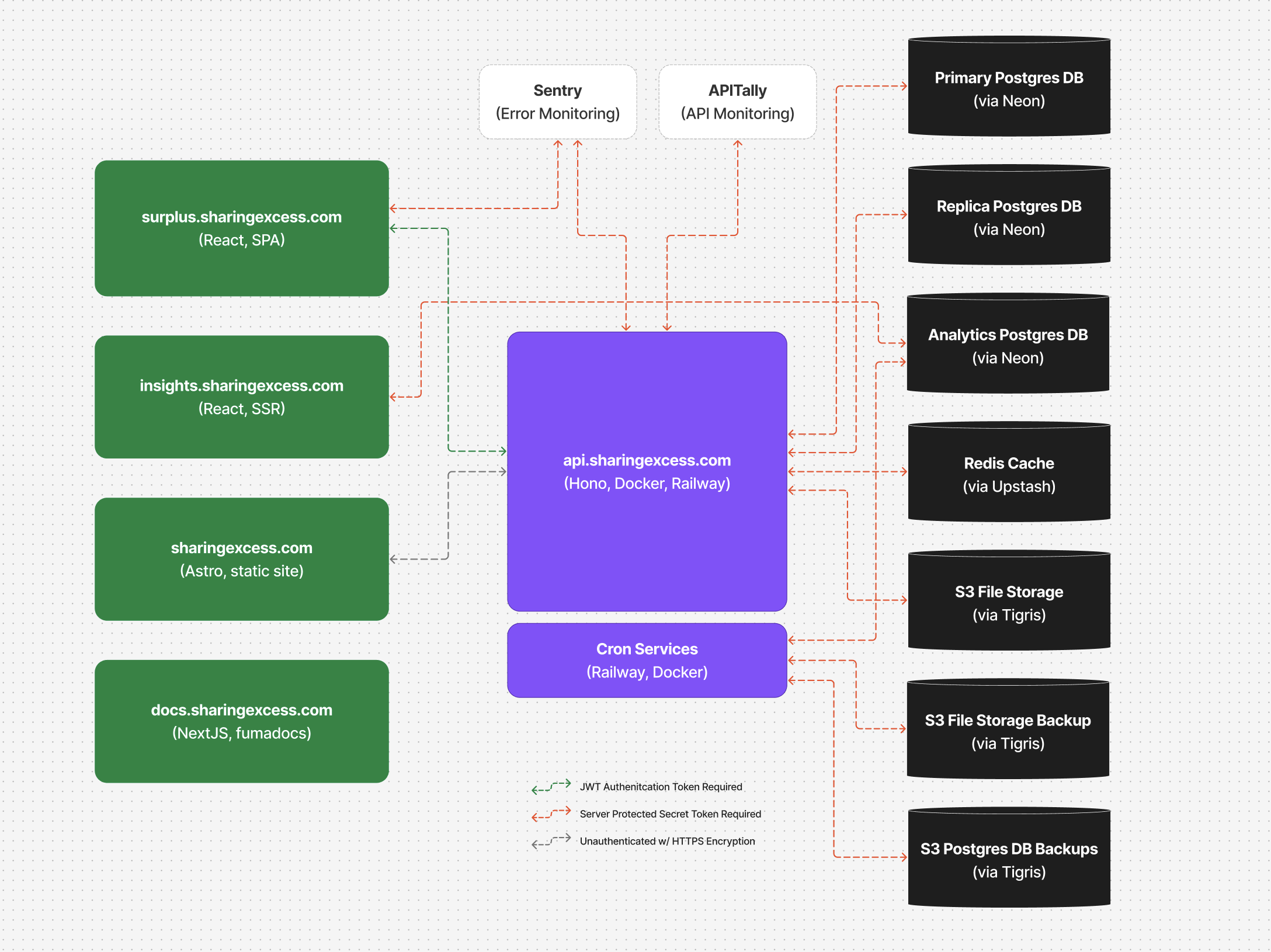. - App screenshots — use the custom
<Screenshot />component, which takes light and dark variants for both mobile and desktop and renders them side by side.
Running and building
cd apps/docs

bun run dev        # dev server on port 4000
bun run build      # production build (Next.js)
bun run typecheck  # type-check the site
The footer shows the platform version, baked in from the root package.json version field at build time.
Deployment
The site builds via apps/docs/Dockerfile (which runs the fumadocs-mdx postinstall and next build) and deploys to Railway. Optionally set NEXT_PUBLIC_SURPLUS_API_BASE_URL to point the sidebar's OpenAPI links at a specific API host.