
Architecture overview
Surplus is a small number of well-separated pieces with one clear rule: everything goes through the API. The web client never talks to a database, a cache, or a file store directly — it makes typed API calls, and the server does the rest. That single constraint is what keeps the system easy to reason about and secure to operate.
The big picture
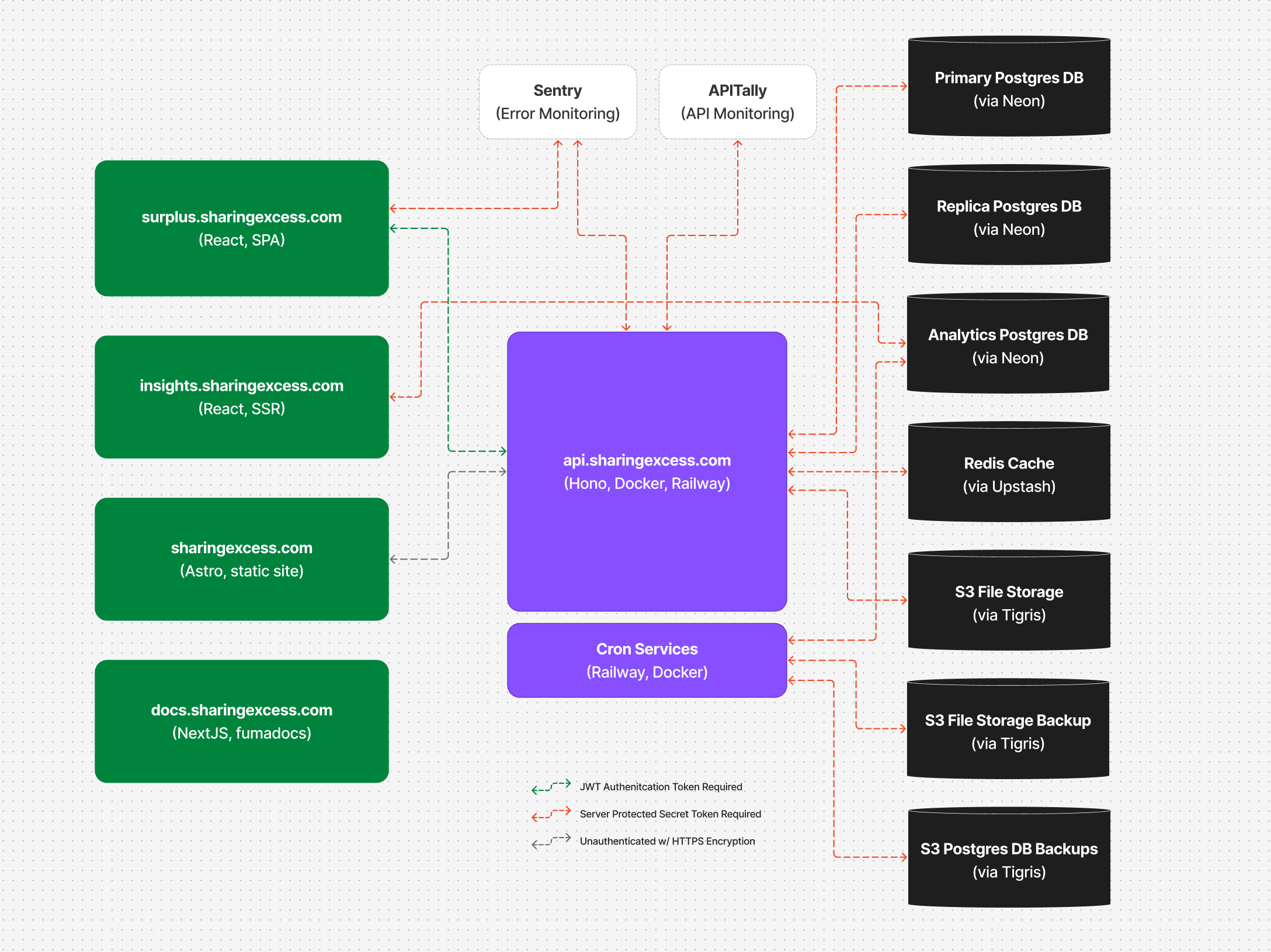
The diagram below shows the whole Sharing Excess ecosystem. The Surplus API sits in the middle; clients are on the left, data stores and backups are on the right, and monitoring is across the top.
Reading the diagram
The connection styles map to trust boundaries — how each link is authenticated:
- JWT auth token required (green) — requests carry a signed session token in an HttpOnly cookie. This is how the browser apps call the API on behalf of a signed-in user.
- Server-protected secret token required (red) — service-to-service links that use server-only credentials (database connection strings, S3 keys, Redis tokens). These secrets never reach the browser.
- Unauthenticated over HTTPS (gray) — public, read-only surfaces such as the marketing site and documentation, still encrypted in transit.
You'll find the same boundaries described in depth in the Security & Compliance section.
What lives in this repository
The diagram covers the broader ecosystem, but this monorepo contains a focused slice of it:
| In this repo | Component on the diagram |
|---|---|
apps/client | surplus.sharingexcess.com — the React SPA |
apps/server | api.sharingexcess.com — the Hono + ORPC API |
apps/docs | docs.sharingexcess.com — this documentation site |
crons/* | Cron Services — analytics caching and backups |
A few components on the diagram are owned elsewhere: the insights.sharingexcess.com analytics app and the sharingexcess.com marketing site each live in their own repositories. Notably, the Analytics Postgres replica is a dedicated Neon read replica consumed by the insights app — the Surplus API in this repo connects only to the primary database and a separate read replica (more on that below).
The apps
- Web client (
apps/client) — a Vite + React 19 single-page app using TanStack Router, Query, and Store. It's what staff, drivers, and partners use. It holds no business logic of its own; it renders data and dispatches typed API calls. See Web client. - API server (
apps/server) — a Hono server that handles every request through ORPC. It owns all business logic, database access, authentication, and file serving. See API server. - Docs site (
apps/docs) — a Next.js + Fumadocs site (this one). See Documentation site.
The shared packages
The apps stay thin because the heavy lifting lives in shared packages:
contracts— the ORPC API contract: every endpoint's method, path, and input/output schema. Imported by both client and server, so they can never drift apart.services— the domain logic, organized as dependency-injected service classes.postgres— the Drizzle ORM schema (the source of truth for the database) and the Neon client.types— shared Zod schemas and the TypeScript types inferred from them.utils— pure functions, constants, and business rules with no I/O.redis— the Upstash Redis client and cache/lock helpers.sharedDeps— curated re-exports of third-party libraries so versions stay aligned.
The Stack section walks through each one, and Shared packages covers how they depend on each other.
The data stores
The API is the only thing that touches these:
- PostgreSQL (Neon) — the primary database for all writes and most reads, plus a read replica for heavier read workloads. Schema is defined in Drizzle under
packages/postgres/src/schema/. - Redis (Upstash) — short-lived state: one-time sign-in codes, rate-limit counters, the analytics cache, and distributed locks for cron jobs.
- S3-compatible storage (Tigris) — uploaded files (attachments, logos, documents), served only through the authenticated API. Separate buckets hold database and file backups.
How a request flows
Every API call follows the same four-layer path — contract, route handler, service class, service function — and every layer is typed end to end. That pattern is the heart of the codebase, and it's worth understanding before you read any feature code:
Continue to the request lifecycle →
Or jump to how the frontend is organized.